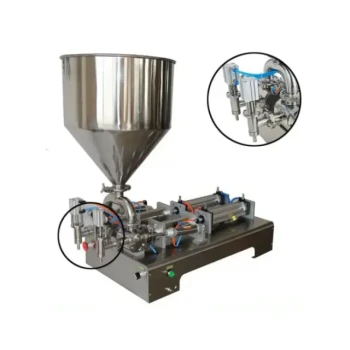
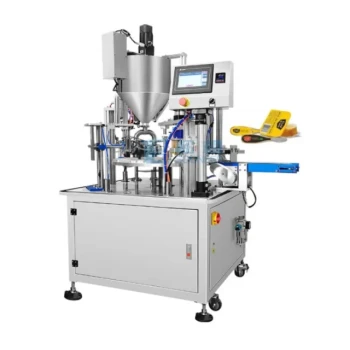
To address display errors on a filling machine's control panel, the immediate first step is to perform a system reset strictly following the guidelines in the operational manual. If the panels remain non-functional or display incorrect data after the reset, the next steps involve cross-referencing specific error messages with the user manual and, if necessary, reinstalling or updating the machine's software.
Effective troubleshooting of control panels starts with eliminating transient faults through a hard reset. If the issue persists, the problem is likely deeper, requiring an analysis of error codes or a software intervention to restore system integrity.
Initial Troubleshooting Protocol
Performing a System Reset
When a control panel is faulty—whether it is blank, frozen, or displaying garbage data—do not immediately assume hardware failure.
Your first action must be to reset the machine.
You must follow the specific reset procedures outlined in the machine’s operational manual to ensure the controller re-initializes correctly.
Analyzing Error Messages
If the reset does not clear the fault, the machine may be trying to communicate a specific internal failure.
Consult the user manual to locate the section on error codes.
Translate any codes or warning lights currently displayed to pinpoint the exact source of the malfunction.
Advanced Resolution Tactics
Addressing Software Corruption
In cases where the hardware appears physically intact but the display logic is flawed, the issue may be software-related.
Attempting to change or update the machine's software can often resolve persistent display glitches.
Ensure you are using the correct software version as specified by the manufacturer before attempting an update.
Checking Associated Calibration
While troubleshooting the display, be aware that control errors can ripple into production settings.
If the display error was accompanied by production inconsistencies, such as fluctuating filling volumes, you may need to reset and adjust the calibration settings once the display is functional.
Understanding the Risks and Limitations
The Risk of Data Loss
Performing a hard reset or a software update may return the machine to factory defaults.
You risk losing custom calibration settings or saved recipes if they are not backed up prior to troubleshooting.
Software vs. Hardware Distinction
Changing software is a valid step, but it cannot fix physical damage.
If the panel is cracked, has loose wiring, or has suffered water damage, software updates will be ineffective.
Always inspect the physical condition of the unit before committing to a time-consuming software reinstall.
Making the Right Choice for Your Maintenance Strategy
To ensure you apply the correct solution to your specific situation, consider the following:
- If your primary focus is immediate operational recovery: Perform a standard system reset according to the manual to clear temporary logic errors.
- If your primary focus is resolving persistent, recurring faults: Consult the user manual to decode specific error messages and proceed with a software update.
By systematically moving from a simple reset to complex software diagnostics, you isolate the root cause without unnecessary hardware replacement.
Summary Table:
| Step | Action Item | Goal |
|---|---|---|
| 1 | System Reset | Clear transient logic faults and frozen screens |
| 2 | Error Code Analysis | Decode specific messages using the operator manual |
| 3 | Software Update | Fix persistent logic glitches or corrupted display data |
| 4 | Physical Inspection | Check for loose wiring, water damage, or cracked panels |
| 5 | Calibration Review | Re-align filling volumes after restoring system access |
Maximize Your Production Efficiency with HONESTBEE
At HONESTBEE, we understand that equipment downtime is a critical challenge for commercial apiaries and distributors. As your dedicated partner in the beekeeping industry, we provide more than just advanced honey-filling machines; we offer comprehensive technical support and a full spectrum of high-quality beekeeping tools, machinery, and consumables.
Whether you are scaling your operation with specialized hardware or seeking reliable wholesale supplies, our expertise ensures your facility runs smoothly and profitably. Don't let technical glitches slow you down.
Ready to upgrade your honey processing line? Contact us today to discover how our tailored equipment solutions can drive your success.
Related Products
- Automatic Honey Filling and Filtering Machine for Beekeeping Bottle Filling
- Pneumatic Double Nozzle Honey Filling Bottling Packaging Machine
- Precision Durable Efficient HONESTBEE Rotary Honey Filling Machine
- Pneumatic Paste Filling Machine Bottling Packaging Machine Single Nozzle
- Fully Automatic Honey Filling Packaging Machine for Processing Line
People Also Ask
- What process advantages do professional honey filtering and filling machines provide? Optimize Your Organic Honey Output
- How do honey filling and filtering machines increase product value? Turn Raw Honey into Premium Export-Grade Goods
- How do honey filtration and filling machinery contribute to industrialization? Scale Your Commercial Honey Production
- What specific issues do industrial filtration and automated filling machinery address? Ensure Honey Quality & Compliance
- How does the use of professional honey filtration and filling machinery facilitate international honey exports?